



Description
The Silent Messenger Between Brain and Compass
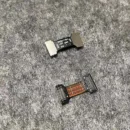
Your DJI Mini 3 Pro or Mini 3 knows where it is, where it’s going, and how to get back—all thanks to GPS. But how does that GPS data actually reach the flight controller? Enter the unsung hero: the GPS to Core Flat Cable. This slim, flexible strip is the vital lifeline that carries navigation signals from the GPS module to the core board. If your drone is acting lost, refusing to lock satellites, or showing random GPS errors, this cable might be the sneaky troublemaker. Swap it out, and your drone’s sense of direction will be back on track—no more flying like it’s in a maze!
Key Features
Precision Fit for DJI Mini 3 Pro and Mini 3
This flat cable is custom-made to fit both the DJI Mini 3 Pro and Mini 3, ensuring perfect compatibility, accurate length, and connector alignment. It’s not a one-size-fits-all ribbon—it’s made to slide and snap right into place without forcing, bending, or risky guesswork. Simple, clean, and reliable.
Connects GPS Module to Core Flight Board
The cable functions as the primary data bridge between the GPS module and the core processing unit, delivering accurate location information to the drone’s brain. Without it, your GPS is just a quiet sensor with no one listening. This cable gets the signal across—fast, intact, and in sync with flight commands.
Flat, Flexible, and Lightweight Design
Designed to be ultra-thin and highly flexible, this cable fits through the narrow internal channels of your drone without interfering with other parts. Its lightweight build ensures it doesn’t affect the drone’s balance or airflow, while its flexibility helps resist cracks and snaps during installation.
Fixes GPS Errors, Signal Dropouts, and Navigation Bugs
If your drone keeps showing “GPS signal lost” mid-flight or refuses to lock onto satellites, the cable might be damaged, pinched, or torn internally. Replacing it restores stable signal flow, eliminating annoying dropouts and helping your drone find its way home with confidence.
Original Connector Quality for Reliable Signal Transmission
Equipped with high-precision connectors at both ends, this cable ensures a secure, low-resistance connection that minimizes interference. The result is accurate and uninterrupted GPS data transmission, which is critical for stable flying, automatic return-to-home, and location tracking.
How to Use
-
Power Off and Remove the Battery: Always start safely.
-
Disassemble the Drone Body: Use precision tools to access the internal components.
-
Locate the GPS Module and Core Board: The cable connects between these two.
-
Remove the Old Flat Cable: Gently unplug both ends without bending the connectors.
-
Install the New Cable: Align and plug in securely. Make sure the cable isn’t twisted or strained.
How to Clean
-
Wipe Gently with a Dry Cloth Before Installation: Keep connectors free of debris.
-
Use Air Blower Around the Ports: Avoid inserting tools into the ports.
-
Never Use Liquid Cleaners: Moisture can damage the signal lines.
-
Avoid Scratching the Ribbon Surface: It could damage internal layers.
-
Inspect Carefully for Dust or Damage Before Closing the Shell: Especially near connectors.
How to Take Care
-
Avoid Bending Sharply During Installation: Always follow the natural curve.
-
Keep Away from Heat Sources: High temps can weaken the cable structure.
-
Don’t Tug During Maintenance: Disconnect with care using tweezers.
-
Store Flat and Sealed When Not in Use: Prevents accidental creasing or contamination.
-
Inspect After Every Crash or Hard Landing: Sudden impacts can loosen or tear it.
Do’s & Don’ts
Do’s:
-
Use with Mini 3 Pro or Mini 3 only
-
Ensure both connectors are firmly locked in
-
Replace at the first sign of fraying or GPS issues
Don’ts:
-
Don’t fold or twist the cable tightly
-
Don’t stretch the cable during install
-
Don’t install while the drone is powered on
Safety Tips
-
Use ESD-safe tools during installation
-
Always remove the battery before opening the drone
-
Label connectors during disassembly for easy reassembly
-
Test GPS signal before reassembling the drone fully
-
Keep away from magnetic tools and surfaces
Final Take
The GPS to Core Flat Cable for DJI Mini 3 Pro / Mini 3 may be small, but it plays a huge role in making sure your drone doesn’t fly blindly. It’s the essential link that keeps your drone connected to the skies, satellites, and safe return paths. If your drone is losing its way, it might not need a new GPS module—just a fresh cable to carry the message.
Order now and get your Mini 3’s brain and compass talking again—because even drones need a good communication line.