


Description
DJI Mavic Mini 3 in 1 Flexible Cable – The Ribbon That Holds the Drama Together
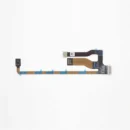
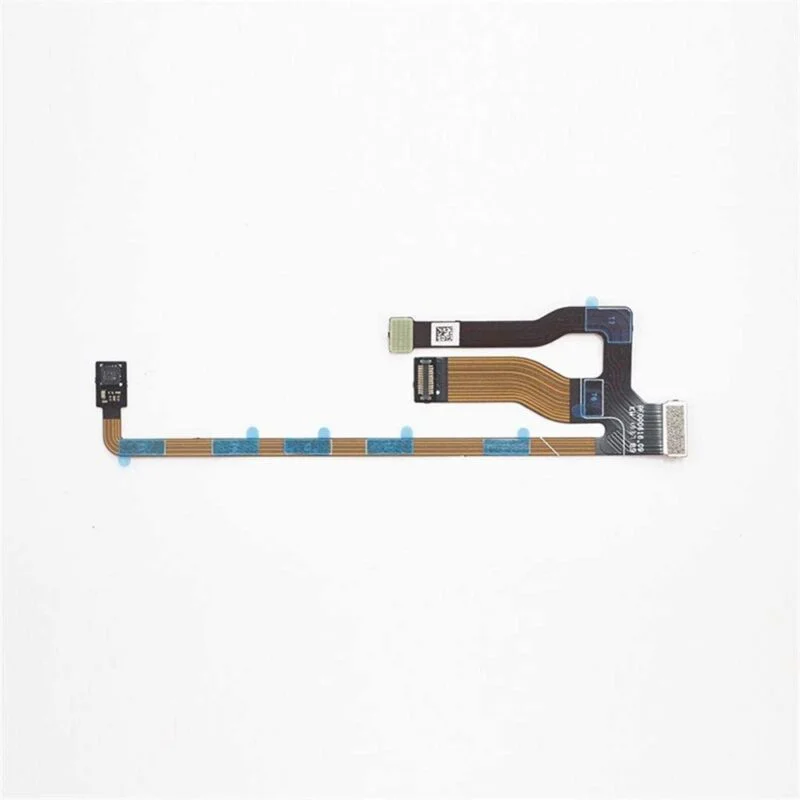
Your DJI Mavic Mini may look cool doing aerial stunts and cinematic pans, but behind the scenes, it relies on this unsung hero: the 3-in-1 Flexible Cable. This flat ribbon cable may look like a slice of spaghetti, but it’s the high-tech nerve center that connects your drone’s camera, gimbal, and transmission system together like best friends in a group chat. If it’s damaged, your drone will start acting like it forgot how to talk to itself. Replace it, and watch your drone become the smooth operator it was born to be.
Features Of the DJI Mavic Mini 3 in 1 Flexible Cable
1. Three Functions, One Super-Slim Cable
Why install three separate cables when you can use one smart strip to handle it all? This 3 in 1 cable connects the camera, gimbal, and signal system in one go, reducing cable mess and confusion. It’s like a multitasking employee who handles IT, HR, and chai duties—all with grace. You get simplicity, order, and cleaner internals, so your drone looks neat and performs even neater.
2. Ultra-Flexible Design for Tight Drone Interiors
Designed with tight drone spaces in mind, this cable bends and folds like a yoga master. Whether your drone’s insides are cramped or compact, this ribbon adjusts without stress or snapping. It moves just the right amount without putting pressure on sensitive connections. Basically, it’s flexible enough to handle your drone’s emotional and electrical needs all at once.
3. Flat Ribbon Style for Easy Routing and Installation
The flat ribbon style makes routing clean and smooth—no bulky wires tangling around your gimbal like noodles in a fan. It lays flat against the internal frame, giving you more room and better airflow. Installation is easier, too, because you don’t have to wrestle with uncooperative wiring. It’s like cable management for people who’d rather fly than fiddle.
4. Perfect OEM Fit with Pre-Cut Connectors
This cable comes with factory-precision connectors on each end, making it a perfect match for the DJI Mavic Mini. No soldering, cutting, or cable crimping required—just slot, click, and done. It fits so well you’d think it came with the drone from day one. Think of it as a plug-and-play solution, minus the usual tech tantrums.
5. Restores Camera and Gimbal Communication Instantly
If your camera has stopped responding or the gimbal is just staring blankly into space, chances are your original cable called it quits. This replacement brings the spark back to that relationship. With one install, you’ll see your drone’s camera tilt, pan, and transmit like the good old days. It’s basically therapy for your drone’s internal communication.
How to Clean the DJI Mavic Mini 3-in-1 Flexible Cable
-
Brush Off Loose Debris – Start with a soft anti-static brush to sweep away dust or tiny particles. Ribbon cables are delicate, so be gentle—as if you’re brushing the hair of a sleeping kitten.
-
Use Isopropyl Wisely – Dampen a lint-free cloth or cotton swab with 90% isopropyl alcohol. Lightly wipe the flat cable’s surface to remove grime or fingerprints, but avoid soaking it.
-
Skip the Water – Never use water or household cleaners. Ribbon cables and liquids go together like drones and thunderstorms—not well.
-
Clean the Connectors – Use a dry, soft-bristle brush to clean the connectors on both ends. If contact pins look grimy, a gentle alcohol swab will do the trick.
-
Dry Before Reuse – Let the cable air-dry completely before reconnecting. A little patience ensures clean contact and no accidental short-circuits.
How to Take Care of the DJI Mavic Mini 3-in-1 Flexible Cable
-
Avoid Sharp Bends – This cable doesn’t like yoga. Keep it flat and avoid creases, sharp bends, or folds. These reduce the cable’s lifespan and can cause signal failure.
-
Use Proper Routing – When installing or replacing the cable, follow the original routing path. Improper placement can result in pinching or stretching when the drone folds or moves.
-
Handle with Care – Never pull the cable directly when disconnecting it. Always hold the connector with tweezers or fingernails and gently detach—no yanking allowed.
-
Store in a Flat Position – If you’re storing a spare cable, keep it in a flat anti-static bag. Don’t roll it tightly or stuff it in your toolkit.
-
Protect the Pins – Keep the connector ends away from moisture, dirt, or fingerprints. Dirty contacts can interrupt signals between your drone’s brain and body.
Do’s & Don’ts
Do’s
Use anti-static tools during installation and cleaning
Follow the drone’s original cable routing layout
Keep the cable flat and uncreased at all times
Clean the contacts before installation
Handle connectors with care, not brute strength
Don’ts
Don’t fold, twist, or stretch the ribbon cable
Don’t touch the connector pins with bare fingers
Don’t install with sharp tools that can damage the cable
Don’t reuse a cable if the surface looks cracked or torn
Don’t force it into ports—it should fit smoothly
Safety Tips
-
Disconnect Power First – Always power off and remove the battery before touching or replacing the flexible cable. A live drone and tiny wires do not mix well.
-
Avoid Static Discharge – Work on an anti-static mat or wear an anti-static wrist strap. Ribbon cables are extra sensitive to static shocks.
-
Label During Disassembly – If you’re working on multiple cables, label them as you disconnect to avoid confusion later. The wrong connection means a very confused drone.
-
Test Before Final Assembly – After replacing or reconnecting, test the drone before closing it up. It saves the pain of re-opening everything later.
-
Don’t Force Anything – If the cable doesn’t fit or seems too tight, stop and realign it. Forcing it can tear the cable or damage the connectors.
Conclusion
The DJI Mavic Mini 3 in 1 Flexible Cable may be small and flat, but it plays a huge role in making your drone function like a pro. It’s the bridge between your drone’s brain and its camera, ensuring smooth movement, clear visuals, and uninterrupted transmission. Whether you’re fixing a flight fail or just being proactive, this cable is the quiet hero that keeps your drone drama-free. Install it today and reconnect your drone’s world in one sleek move!